Microchess is a smaller version of standard 8x8 chess, played on a 5×4 board.
Games are faster and simpler than regular chess since there are fewer pieces and smaller board size,
but careful planning and strategy are still needed to win.
Its compact size makes it ideal for experimenting with intelligent agents
while keeping the game interesting and challenging. For more details, check out this
link.
5×4 Microchess Board
Pieces
Each side has the following pieces - King, Rook, Bishop, Knight, and Pawn. The movement and capture rules for each piece
follow the standard rules of classical 8x8 chess, summarized below:
King: Moves one square in any direction (horizontally, vertically, or diagonally).
It cannot move into a square that is under attack by an opponent’s piece.
Rook: Moves any number of vacant squares horizontally or vertically.
Bishop: Moves any number of vacant squares diagonally, as long
as no other piece blocks its path. A bishop always remains on the same color square
it started on.
Knight: Moves in an “L” shape — two squares in one direction
(horizontal or vertical) followed by one square perpendicular to that direction.
Knights can jump over other pieces.
Pawn: Moves forward by one square (toward the opponent’s side).
On its first move also, it may move forward by one square only.
Pawns capture diagonally forward by one square.
Queen*: Combines the powers of the Rook and Bishop. It can move any number of vacant squares
vertically, horizontally, or diagonally, as long as no other piece blocks its path. The queen is the most
powerful piece on the board due to its versatile movement.
Note: The Queen is not present in the initial setup of Microchess but can be obtained through pawn promotion (explained later).
The videos below demonstrate the legal moves for each chess piece in different scenarios:
King Moves
Rook Moves
Bishop Moves
Knight Moves
Pawn Moves
Queen Moves
Players
Microchess is played between two players, White and Black.
White always moves first, followed by Black, and players alternate turns.
The goal is to checkmate the opponent’s King — putting it in a position where it is under threat
and cannot move to a safe square. All rules for piece movements, captures, and game termination
apply equally to both players.
Game Termination Conditions
The game ends under any of the following conditions:
Checkmate (Win):
A player wins if the opponent’s King is in check
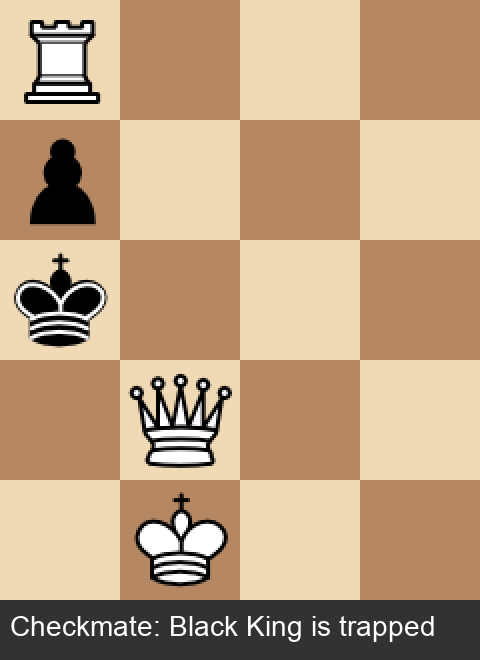
and has no legal moves to escape. In simple words: the King is trapped and cannot move to safety. The image below illustrates
one such position where White has checkmated Black. The Black King is under attack by the
White Queen and cannot move to any allowed square without being captured.
Checkmate Position: White wins
Stalemate (Draw):
The game is a draw if the player
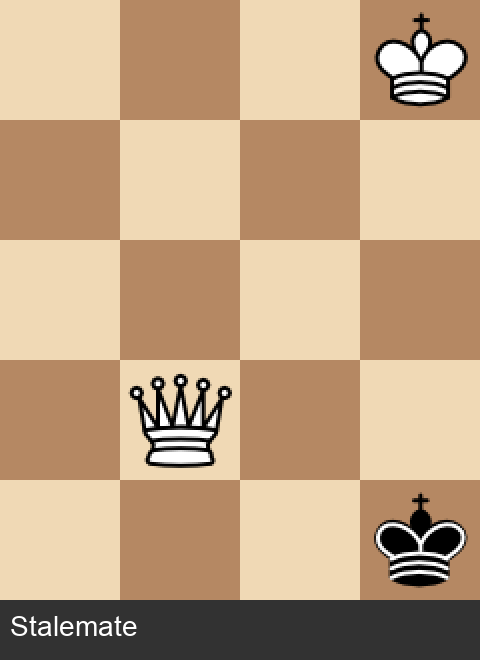
whose turn it is has no legal moves, but their King is not in check. The image below shows a position where the game is a stalemate.
It is Black's turn to move, and although the Black King has three available squares on the board, each would place it in check so each of these is an illegal move.
As a result, Black has no legal moves available, yet the King is not currently in check.
Stalemate Position: Draw
Draw by inactivity:
If no captures occur and no
pawns move forward for more than 20 consecutive moves, the game is declared a draw.
Draw by insufficient material:
The game is a draw
if neither player has enough pieces to force a checkmate — specifically, if both
players only have their King, or at most a King + Bishop or King + Knight combination
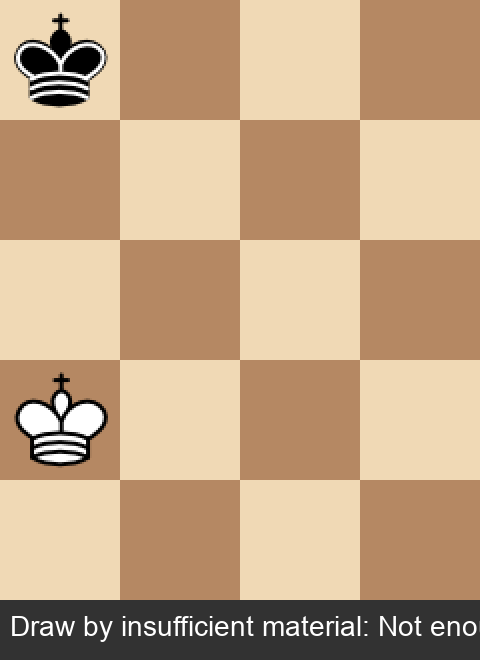
(no pawns or rooks remaining). In the image below, both players only have their Kings left,
making it impossible to checkmate.
Draw by insufficient material
Pawn Promotion
When a pawn advances all the way to the last row on the side of the opponent, it can be promoted to any piece (except King) — Rook, Bishop, Knight, or Queen.
This allows a player to strategically gain stronger pieces during the game. The video below demonstrates a Black Pawn being promoted to a Black Queen upon reaching the last row.
Pawn Promotion
In this simplified version of Chess, complex rules like castling and en passant are ignored.
Agents
In this assignment, you will design an agent to play microchess.
Given a board position and a set of possible legal moves, the agent will choose
the most appropriate move at each step. The agent should be able to play both as a white or a black player.
If playing multiple games, the agents keep swapping their places from white to black in every game, so that they
both evenly play as both white and black.
You are given three tasks and you need to design agents to
accomplish them. You may choose to have the same agent for all the tasks or different agents for each task.
You are given two agents to play against:
Random Agent: Uniformly picks one action randomly from the set of all legal moves.
Rational Agent: Thinks strategically and then plays the game. (Exact details
are not provided, as you need to design your own agent.)
In this setup, the state of the agent is the current board situation along with the player's turn, and the action is
a legal move out of all possible legal moves in that state.
Game Environment and Code Structure
This compressed files given below contains the Microchess environment and supporting files.
This environment is based on the
Explainable-Minichess repository,
with necessary modifications for this assignment.
You do not need to modify the core environment;
you only need to focus on implementing your agent in the provided skeleton files. Download the file corresponding to your OS.
You must ensure that you have Python 3.9.6. You can install Python 3.9.6 from
here.
Your code will be tested using a python virtual environment. You can set up a virtual environment using
this link.
Follow the given steps to set up the environment:
Download the compressed folder based on your OS.
Install the required packages listed in requirements.txt by running:
python -m pip install -r requirements.txt
You are allowed to use other libraries apart from the ones mentioned in the requirements.txt file for your implementation.
2. Code Structure
Inside the directory, you are provided with the following (along with the core game environment files):
agents/: This directory contains templates for your agents for each task,
along with binaries for the provided random and rational agents. You need to implement your agents
inside the respective files:
task1_agent.py for Task 1
task2_agent.py for Task 2
task3_agent.py for Task 3
Implement your logic within the move() function in each file.
If you choose to use the same agent for all three tasks, you can keep the move()
function identical across these files. If your agent maintains an internal state for every game, then you should implement the reset() function. The
base_agent.py contains the BaseAgent class which your agents for each task inherit from.
autograder.py: A script to play matches between two agents. It can be run using the command:
Task 1: Your agent in agents/task1_agent.py plays against a random agent.
Task 2: Your agent in agents/task2_agent.py plays against a pre-defined rational agent.
Task 3: Your agent in agents/task3_agent.py plays against the rational agent.
If --task option omitted then all three tasks are tested.
The variable NUM_GAMES defines the number of matches
to be played between the agents and can be modified for testing. For evaluation, it is fixed for 100 games.
In half the matches your agent plays as white and the opponent plays as black, and the other half matches vice-versa.
The agents keep switching white and black after very game.
When the script is run, it prints the final results of all matches between the two agents.
The output includes:
The number of wins for each agent as White and as Black.
The total wins for each agent across all games.
The average time per move for each agent.
The total number of draws across all games.
The average game length in full moves (a full move means one turn of White player and one turn of Black player).
The average game plies (the average number of half moves, here one half move means one turn by any player).
Additionally, you have an option to save FEN (Forsyth-Edwards Notation of the game state, check here) representations of the game at every move which can be used later for
visualization using the script visualize_gameplay.py. To enable this, use the optional --save_fens flag. The FENs are stored in the fens/ directory and the game results are stored as .json files in the results/ folder.
visualize_gameplay.py: This script allows you to visualize a game between two agents using the FENs stored during the game.
You can run it using the command:
where --fen_path specifies the path to the FEN file for the game you want to visualize.
This will open a window displaying the game board and pieces, and sequentially show each move made during the game. You can click space bar to pause
it and then use right and left arrows to move forward and backward in the game, respectively. Clicking the space bar again resumes the gameplay.
The microchess board used for this assignment is defined in minichess/boards/5x4microchess.board.
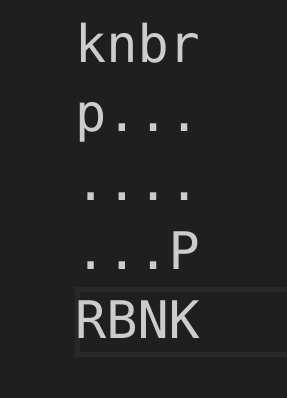
5×4 Microchess Board Representation
Piece legend:
K / k: King
R / r: Rook
B / b: Bishop
N / n: Knight
P / p: Pawn
Uppercase letters represent White pieces, while lowercase letters represent Black pieces.
3. Agent Interface & Helper Functions
The chess_object parameter input to the move() function
is an instance of the Chess class defined in minichess/chess/fastchess.py.
It contains all the information you may need to design your agent. Important attributes and methods you may need
are described below:
Important Attributes of Chess Object
turn: Indicates whose turn it is — 1 for white, 0 for black
(Your agent will be called whenever it is its turn to play. You can determine whether your agent is playing as White or
Black by checking the turn attribute).
has_legal_moves: Indicates whether the agent currently has at least one legal move available. It returns a boolean value: False if
the agent has no legal moves left, True otherwise.
Useful Methods and Helper Functions
chess_obj.legal_moves():
This function returns a tuple of 2 matrices (piece_matrix, promotion_matrix), one which encodes information of all possible moves at that state and another which encodes moves that result in a pawn promotion. The output is in
an intermediate format which is given as input to the piece_matrix_to_legal_moves() function in order to obtain
a list of all legal moves in a simpler format.
piece_matrix_to_legal_moves(piece_matrix, promotion_matrix):
This function takes the output returned by the chess_obj.legal_moves() function and converts it into a list of all possible legal moves at that state. Each move is represented as a tuple (position, delta, promotion) where:
position: A tuple (i, j) representing the row (rank) and column (file) of the piece to move. Row 0 is the top, column 0 is the leftmost.
delta: A tuple (dx, dy) representing the change in row and column (how far to move the piece).
promotion: An integer representing the piece type to promote a pawn to (1–4), or -1 for normal moves. 1–4 correspond to knight, bishop, rook and queen respectively.
chess_obj.make_move(i, j, dx, dy, promotion=-1): This member function of Chess class executes a move on the board. Here,
i, j: Row (rank) and column (file) of the piece to move. Row 0 is the top, column 0 is the leftmost.
dx, dy: Change in row and column (how far to move the piece).
promotion: Optional, piece type to promote a pawn to (1–4), default -1 for normal moves. 1–4 correspond to knight, bishop, rook and queen respectively.
This function updates the board state when called.
Typically, you first get legal moves in an intermediate format using chess_obj.legal_moves() function, pass the output
to the piece_matrix_to_legal_moves() function to get a list of all legal moves,
then pick a move from the list of available moves and call make_move() function with the chosen move.
The example shown above gets all legal moves at a particular state and picks the first move from the list. Then it calls the
make_move() function to execute that move on the board.
chess_obj.piece_at(i,j,turn): Returns the piece at the specified position (i,j) for the given turn (colour). It returns -1 if none found. The integers
returned correspond to the piece types: 0 for Pawn, 1 for Knight, 2 for Bishop, 3 for Rook, 4 for Queen, and 5 for King and the turn is 1 for White and 0 for Black.
chess_obj.any_piece_at(i,j): Returns the piece-type at the given position and its color, if any. The function returns
a tuple (piece_type, color) where piece_type is an integer representing the type of piece (0-5 as above) and color is either 1 for white or 0 for black.
chess_obj.find_king(turn): Returns the (i, j) position of the King for the specified turn (1 for white, 0 for black). Similarly, you have functions like
chess_obj.find_queen(turn) to find position of queen.
chess_obj.agent_board_state(): Creates and gives the complete game state as a n x m x d numpy array.
For Microchess, we get 5 x 4 x 19 matrix, encoding the position of all pieces (6×2) and also information about castling,
en passant, no advantage moves for both players and current player's turn (2 × (1+1+1) + 1 = 7), totalling 12 + 7 = 19 layers of the 5×4 board. Mainly used as input for neural net models.
(Check in section Methods/Representations from this seminal paper)
chess_obj.game_result(): Returns the game result if the game has ended (default is None), 1 for white win, -1 for black win, 0 for draw.
If you require any other details other than the ones mentioned above, you can explore the
minichess/chess/fastchess.py and minichess/chess/fastchess_utils.py files.
4. Bitboard Representation
The microchess board is represented using a bitboard representation for efficient computation in the game
environment. A bitboard uses a 64-bit integer to represent the state of the chessboard,
where each bit corresponds to a square on the board for the classical 8x8 chess. Similarly, for the 5x4 microchess board,
only the first 20 bits of the integer are used, with each bit representing a square on the 5x4 board. Many functions
in the environment use this representation for fast calculations of moves and game states. You can read more about bitboard representation
here.
Minimax Search Algorithm
Before we get into the tasks, let us familiarize ourselves with a common search algorithm that is used to play games like chess.
Games similar to chess, where two players compete and the gain of one (+1) corresponds to the loss
of the other (-1), are generally called zero-sum games,
because the sum of the players’ rewards is zero.
Say for some initial state s, action a, final state s' :
Reward for player 1 = +R(s,a,s')
Reward for player 2 = -R(s,a,s')
Player 1 aims to increase its reward by maximizing R(⋅) while Player 2 tries to
maximize its own reward, which effectively means minimizing Player 1's reward by minimizing R(⋅).
Using this idea, we can develop an algorithm that explores
all possible moves for both players alternately up to a certain depth (one turn by a player).
The algorithm evaluates the resulting terminal states and traces back,
assuming that each player chooses moves to either maximize or minimize the
reward function depending on whose turn it is.
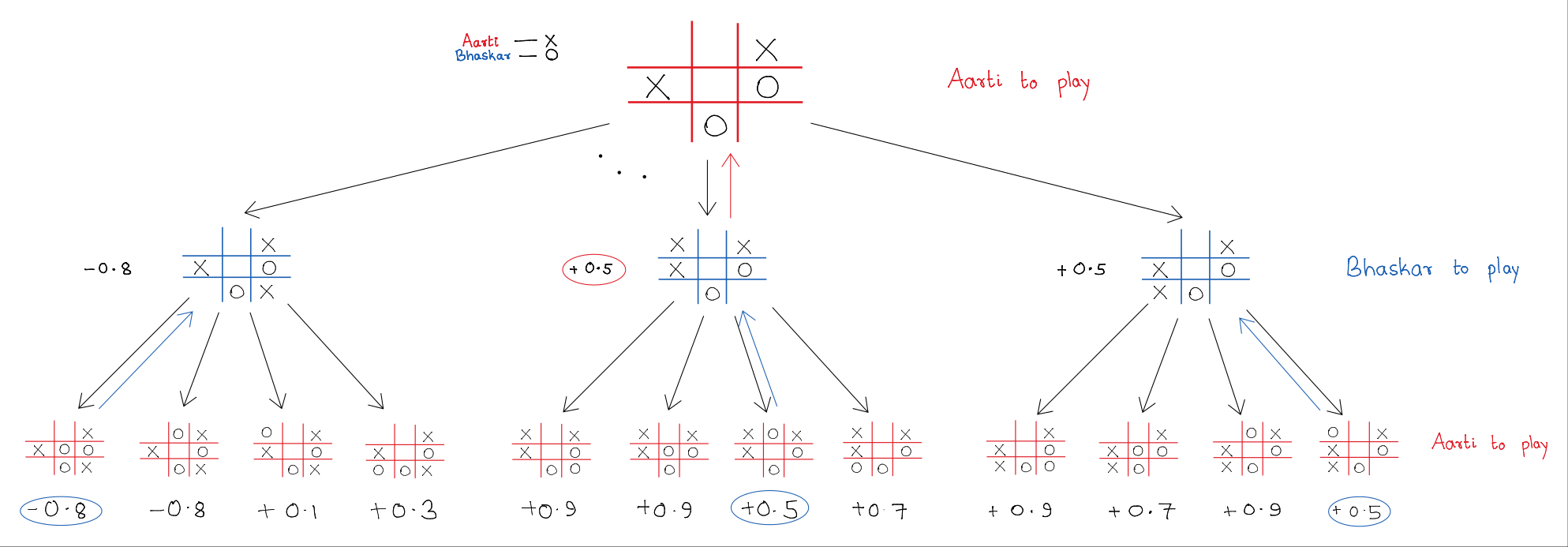
For example, consider Aarti and Bhaskar playing tic-tac-toe.
Aarti uses crosses and Bhaskar uses circles.
Let the reward function be positive for Aarti and negative for
Bhaskar if Aarti wins, and vice versa. A draw gives zero reward to both.
Rewards are only assigned at terminal states, not during the game.
Suppose the game has progressed to the following stage:
Now Aarti has to make a move and plans to look two levels deep.
She has five options at depth one; three of them are shown above.
For each of these, Bhaskar has four options at depth two, the last level.
At this stage, Aarti estimates the 'goodness' of each resulting state
using a function she has constructed. The numbers below the leaf nodes
represent her estimated rewards. While the actual game rewards are +1, 0, or -1,
Aarti’s evaluation can be any numerical estimate.
Since Bhaskar aims to minimize Aarti’s score, he chooses the move with the least reward for her.
This is shown by the blue arrows pointing upwards, carrying Bhaskar’s 'best value' (the worst for Aarti).
Aarti then picks the move with the maximum value among her options, indicated by the red arrows going up
to the root node. This determines the best move she should make from her current state.
This procedure is known as the
Minimax algorithm,
commonly used in zero-sum discrete games.
You are encouraged to implement the same algorithm for chess, as well!
Task 1: Playing against Random player (3 Marks)
Design an agent that maximises its wins against an opponent that plays randomly, i.e., when the opponent player selects a move uniformly at random from the
set of all legal moves.
You may choose to implement the minimax algorithm with a handcrafted evaluation function to determine the best move.
You should limit your search to maximum depth 2 (Hereafter, depth refers to the number of plies, which means a single turn by a player). Your agent should not take more than
5ms for each turn, on average.
Your score will be based on 100 games played against the random player.
The agent's score will be +1 for every win, -1 for every loss and 0 for draw. Your agent must score at least 27 points.
You should design and write code for your agent in the move() function of agents/task1_agent.py file. You are
free to define any other helper functions or classes as needed. Your agent should follow the BaseAgent template described above.
Task 2: Playing against Rational player (3 Marks)
Now you must design an agent that maximises its wins against an opponent that takes calculated decisions to win.
You can use the helper functions described above to extract information about the state of the game.
You may choose to implement the minimax algorithm with a handcrafted evaluation function to determine the best move.
You must limit your search to not more than depth 4. Your agent should not take more than
100ms for each turn, on average.
Your score will be based on 100 games played against our rational player. The agent's score will be +1 for every win,
-1 for every loss and 0 for draw. Your agent must score at least 20 points.
As an example of evaluation score, you can count how many of white pieces are there how many of black and compare them to get an empirical score for that state.
You can look at threat to pieces, king defense, mobility, etc. and build a score function. Here you may need to use the helper functions listed above.
There are several more functions in the code file which you are free to use.
You should design and write code for your agent in the move() function of agents/task2_agent.py file. You are
free to define any other helper functions or classes as needed. Your agent should follow the BaseAgent template described above.
Task 3: Build your Best agent (4 Marks)
Finally, you are free to choose your favourite learning algorithm to train and come up with your best agent that
plays Microchess. You may generate episodes of games using the functions described above, if needed. Your search depth should not exceed a depth of 5.
The average time taken by your agent for each move should be under 200ms during the actual game play. Exceeding
the time limit for each move may result in a loss of marks.
Your score will be based on 100 games played against the random player.
The agents score will be +1 for every win, -1 for every loss and 0 for draw. Your agent must score at least 50 points.
You should design and write code for your agent in the move() function of agents/task3_agent.py file. You are
free to define any other helper functions or classes as needed. Your agent should follow the BaseAgent template described above. There is no autograder for Task 4.
You are free to use any form of reinforcement learning (or non-reinforcement-learning) to train your agent for this task. Policy search (covered in class in Week 9) is likely to be the easiest to implement and iterate.
Task 4: Optional Tournament Entry for Extra-credit
This task has been added towards a fun, open-ended challenge. It is
not mandatory; you can receive full marks for the programming
assignment without working on this task. However, as an incentive, we
will offer a small amount of extra credit for it.
The agent you submit under this task, if you qualify, will be a
part of a tournament in which all qualifying submissions from the
class will compete. You qualify if you get full marks on tasks 1, 2,
and 3 when we test them (we will run against the same opponents as you
have been given for these tasks, but may change the random seeds). As
yet, the structure of the tournament has not been determined. You can
assume that your agent will play a random subset of the other agents,
with each match between a pair of players having each play one game as
white and one as black. The number of matches between a pair of
agents, the number of matches each submission plays, and so on, will be
decided by us only after all submissions are received.
The main challenge of Task 4 is in not knowing the strategies of
your opponents! Hence, if you want to develop a specialised agent for
this task (nothing stops you from submitting your Task 3 agent
itself), you should think about how to play "sufficiently well"
against any type of opponent. A more technical dive into this topic
will take us to the arena of game theory, but given the time left to
work on this agent, you should perhaps just do it based on intuition
and in the spirit of doing something for fun.
Your agent must be implemented much like the ones for the previous
tasks. Your search depth must not exceed 5, and the average time taken
by your agent for each move be at most 500ms during game play. If your
agent takes too long to make its moves during any game, it will be
disqualified from the tournament. As before, a win will merit 1, a
draw 0, and a loss -1. It is common in real tournaments to shift and
scale these scores to 1, 0.5, 0―which would still achieve the same
ranking between players.
It is not possible to specify the format of the tournament we shall
conduct, since we do not know how many qualifying entries we will
receive, nor how they will perform against each other. For example, if
most games result in draws, it might become difficult to confidently
select the top entries. We can only commit that a "reasonable" format
will be designed, and afterwards the results transparently shared with
the class.
Extra credit will be up to a maximum of 5 marks, and expected to be
awarded to approximately 10 students. This credit will add to the
course total.
If you would like to participate, copy
the agents/task3_agent.py file into a file
called agents/task4_agent.py, and as with the Task 3
agent, edit the move() function. As before, you are free
to define any other helper functions or classes as needed, and your
agent should follow the BaseAgent template described
above.
Winning entry
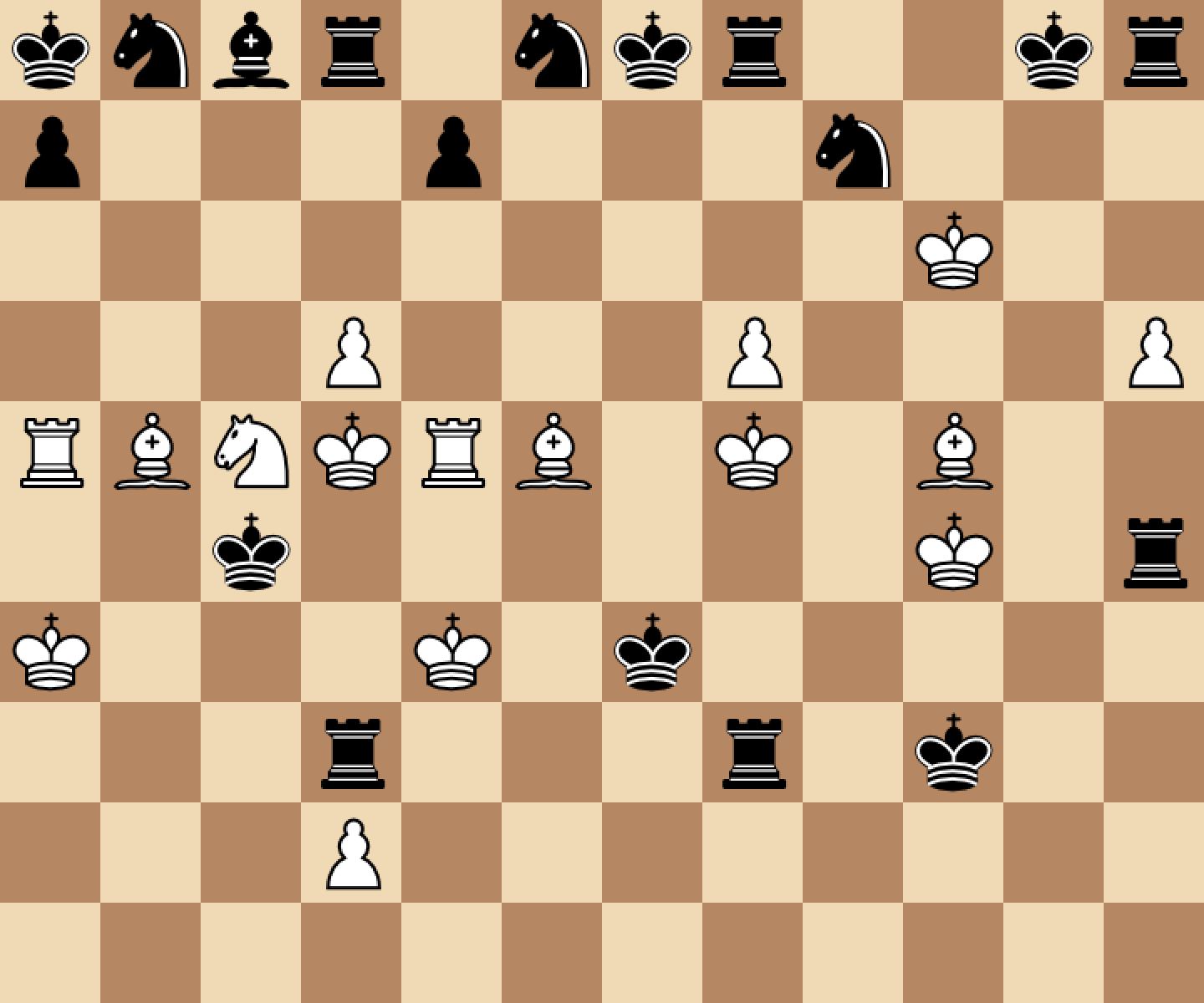
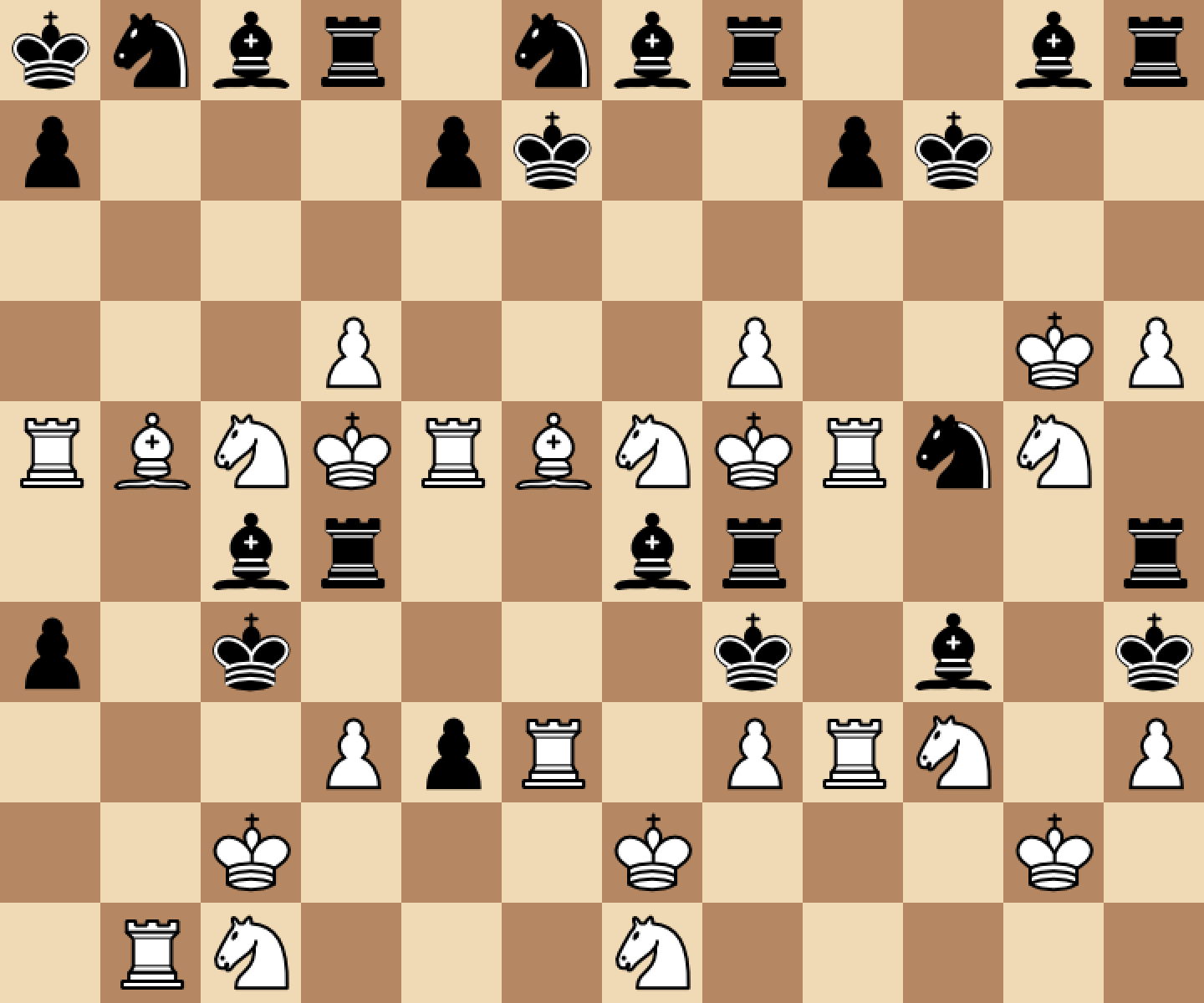
We congratulate Bheesetti Yaswanth Ram Kumar (23B1277) for winning
the tournament by a clear margin. Below are two games of his agent
against the one we provided for Task 3.
23b1277 plays black.
23b1277 plays white.
Report (2 marks)
Unlike previous assignments, you have been given a free hand to design your agent for Microchess.
Your report should include the following details for each of the agents you have developed.
A detailed description of your approach for selecting moves.
The algorithm or logic your agent uses to determine the best move.
List the heuristics, evaluation functions, or rules used to rank moves or assess positions.
If training was involved, a clear explanation of the training algorithm and methodology.
Key experiments or observations that influenced your final approach.
Your report should be clear and informative, as it will help the
TAs and instructor understand your design choices.
The report, along with your code, may be examined to corroborate the results.
Insufficient explanation may result in a loss of marks.
You do not have to write about your Task 4 entry in the report, although you are welcome to.
Submission
Organize your submission folder as shown below. For example, if your roll number is 22B1831,
your submission folder should be named 22B1831_submission and structured as follows:
Note that you must also include a references.txt file if you have referred to any resources while working on this assignment (see the section on Academic Honesty on the course web page).
Tar and Gzip the directory to produce a single compressed file named <your_roll_no>_submission.tar.gz, for example 22B1831_submission.tar.gz. If you are submitting any
additional files including parameters or weights, please include them in the extra_files/ directory and ensure that the file
size does not exceed 1MB. If extra libraries used then they should all be recorded in requirements.txt file with proper version numbers.
If you are submitting an entry for Task 4, also include the file agents/task4_agent.py.
Evaluation
The assignment is worth a total of 12 marks.
Task 1 and Task 2 are each worth 3 marks, while Task 3 carries 4 marks.
Marks for each task will be awarded based on your agent’s performance, considering
the number of wins, losses, draws, and the time taken per move for each task.
The remaining 2 marks are allocated for the report.
Deadline and Rules
Your submission is due by 11.59 p.m., Wednesday, November 5. Finish working on your submission well in
advance, keeping enough time to test your code,
compile the results, and upload to Moodle.
Your submission will not be evaluated (and will be given a score of zero) if it is not uploaded to
Moodle by the deadline. Do not send your code
to the instructor or TAs through any other channel. Requests to evaluate late submissions will not be
entertained.
Your submission will receive a score of zero if your code does not execute using the given python
virtual environment. To make sure you have
uploaded the right version, download it and check after submitting (but well before the deadline, so you
can handle any contingencies
before the deadline lapses).
You are expected to comply with the rules laid out in the "Academic Honesty" section on the course web
page, failing which you are liable to
be reported for academic malpractice.
 King: Moves one square in any direction (horizontally, vertically, or diagonally).
It cannot move into a square that is under attack by an opponent’s piece.
King: Moves one square in any direction (horizontally, vertically, or diagonally).
It cannot move into a square that is under attack by an opponent’s piece. Rook: Moves any number of vacant squares horizontally or vertically.
 Bishop: Moves any number of vacant squares diagonally, as long
as no other piece blocks its path. A bishop always remains on the same color square
it started on.
Bishop: Moves any number of vacant squares diagonally, as long
as no other piece blocks its path. A bishop always remains on the same color square
it started on. Knight: Moves in an “L” shape — two squares in one direction
(horizontal or vertical) followed by one square perpendicular to that direction.
Knights can jump over other pieces.
Knight: Moves in an “L” shape — two squares in one direction
(horizontal or vertical) followed by one square perpendicular to that direction.
Knights can jump over other pieces. Pawn: Moves forward by one square (toward the opponent’s side).
On its first move also, it may move forward by one square only.
Pawns capture diagonally forward by one square.
Pawn: Moves forward by one square (toward the opponent’s side).
On its first move also, it may move forward by one square only.
Pawns capture diagonally forward by one square. Queen*: Combines the powers of the Rook and Bishop. It can move any number of vacant squares
vertically, horizontally, or diagonally, as long as no other piece blocks its path. The queen is the most
powerful piece on the board due to its versatile movement.
Queen*: Combines the powers of the Rook and Bishop. It can move any number of vacant squares
vertically, horizontally, or diagonally, as long as no other piece blocks its path. The queen is the most
powerful piece on the board due to its versatile movement.