Sample Files
Download sample input and output files to understand the expected format before entering your own network.
Input, Output & Objective
Variables marked {} are optional.
Input
- Source node: head
- Node: elevation, {demand}, {min pressure}
- Pipe: start/end node, length, {roughness}, {diameter}, {parallel allowed}
- Commercial pipe diameter: cost
- ESR: construction cost, capacity factor, {max height}
- Pump: efficiency, capital cost/kW, energy cost/kWh, lifetime, {discount & inflation rate}
Output
- Pipe diameters
- [ESR: location, height, capacity, nodes served]
- [Pump: location, power, head provided]
Objective & Constraints
- Minimize total pipe cost [+ ESR cost] [+ Pump cost]
- Min pressure maintained at each node
- Demand met at each node
- Diameters from commercial pipe data only
- Network must be branched (no loops)
- Single sourced
Map Tab
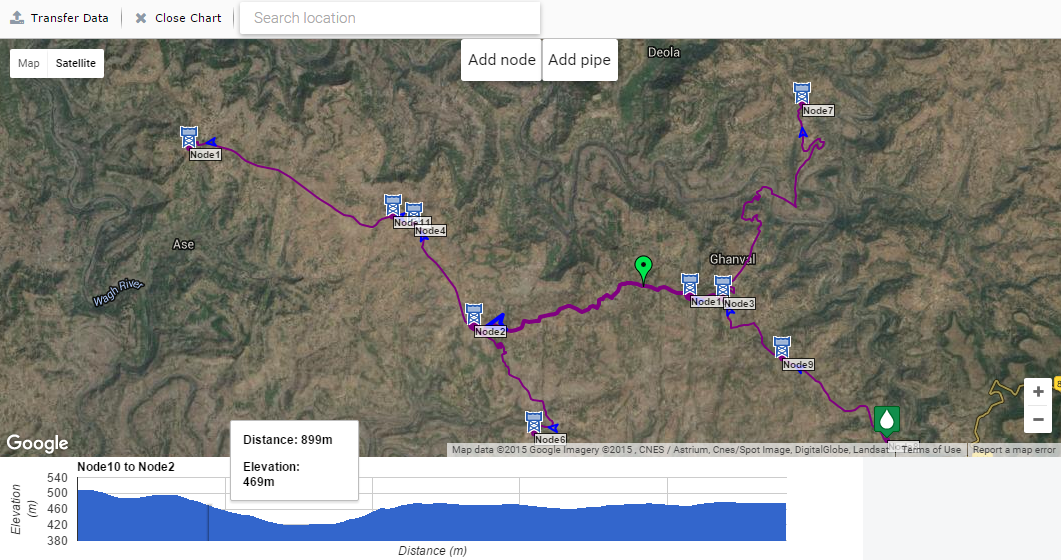
| Action | Description |
|---|
| Transfer Data | Transfer node and pipe information to the Nodes and Pipes tabs. |
| Close Chart | Deselect the currently selected pipe and close its elevation chart. |
| Search Location | Search for a location on the map. Type and select from the dropdown or press Enter. Can also enter lat/long coordinates directly. |
| Add Node | Click the button then click a point on the map to add a node. You can modify the node name, ID, and location (lat/long or by dragging), and set whether it is the source or an ESR node. |
| Add Pipe | Click the button then click two existing nodes to add a pipe between them. |
| Right-click map | Options to add/edit/delete nodes, add/delete/split pipes, or close the elevation chart. |
| Right-click node | Options to delete or edit the node. Deleting a node removes all connected pipes. |
| Right-click pipe | Options to delete or split a pipe, or close the elevation chart. Splitting adds a node at the split point and creates two pipes. |
General Tab
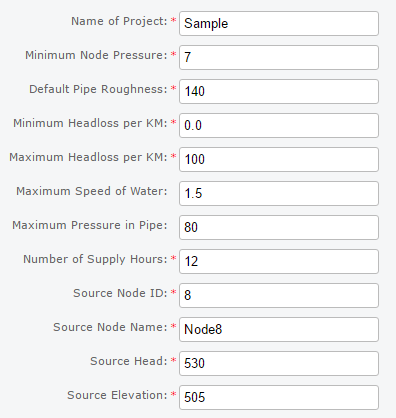
| Field | Description |
|---|
| Name of Project Text | Your project name. |
| Minimum Node Pressure Double (m) | Default minimum pressure that must be maintained at all nodes. |
| Default Pipe Roughness Double | Default roughness used to calculate headloss in pipes. |
| Minimum Headloss/KM Double (m) | Minimum headloss per km allowed in each pipe. |
| Maximum Headloss/KM Double (m) | Maximum headloss per km allowed in each pipe. |
| Maximum Water Speed Double (m/s) optional, default: no constraint | Maximum speed of water in metres per second allowed in a pipe. |
| Maximum Pipe Pressure Double (m) optional, default: no constraint | Maximum pressure in metres in a pipe. Not strictly enforced — a warning is shown if exceeded. |
| Number of Supply Hours Double | Hours per day that water is supplied. E.g. 12 hours = peak factor of 2. |
| Source Node ID Integer | Unique node ID of the source. |
| Source Node Name String | Name of the source node. |
| Source Head Double (m) | Constant water head provided by the source. |
| Source Elevation Double (m) | Elevation of the source node. |
Source details should not be duplicated in the Nodes tab.
Nodes Tab
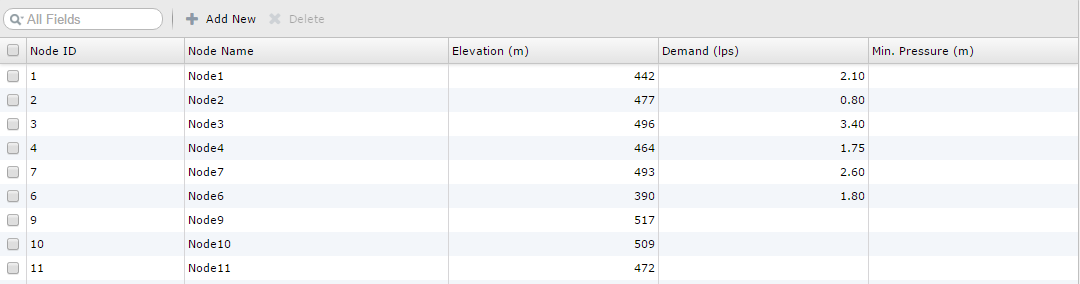
| Field | Description |
|---|
| NodeID Integer | Unique node ID. |
| Node Name String | Name of the node. |
| Elevation Double (m) | Elevation of the node. |
| Demand Double (L/s) optional, default: 0 | Water demand of the node. |
| Min. Pressure Double (m) optional | Minimum pressure at this node. Defaults to the value in the General tab. |
| Add New | Add an extra row for one node. |
| Delete | Remove selected rows. |
Pipes Tab
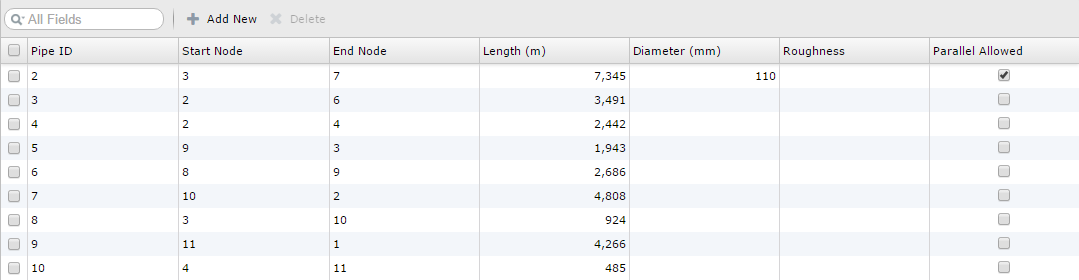
| Field | Description |
|---|
| PipeID Integer | Unique pipe ID. |
| Start Node Integer | Node ID of the start node. |
| End Node Integer | Node ID of the end node. |
| Length Double (m) | Length of the pipe. |
| Diameter Integer (mm) optional | Diameter of the pipe. If not set, it will be calculated by the optimizer. |
| Roughness Double optional | Roughness used to calculate headloss. Defaults to value in General tab. |
| Parallel Allowed Boolean optional, default: false | Whether a new pipe can be placed in parallel with this one. |
| Add New | Add an extra row for one pipe. |
| Delete | Remove selected rows. |
Commercial Pipes Tab
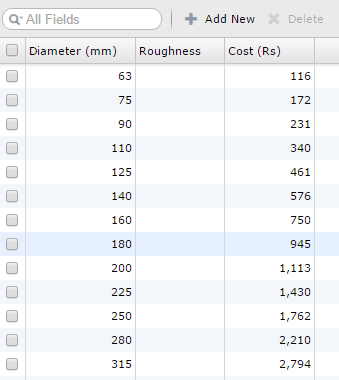
| Field | Description |
|---|
| Diameter Integer (mm) | Unique diameter of the commercial pipe. |
| Roughness Double optional | Roughness of this pipe. Defaults to value in General tab. |
| Cost Double (Rs/m) | Cost per metre of this commercial pipe. |
| Add New | Add an extra row for one commercial pipe diameter. |
| Delete | Remove selected rows. |
ESR Tab
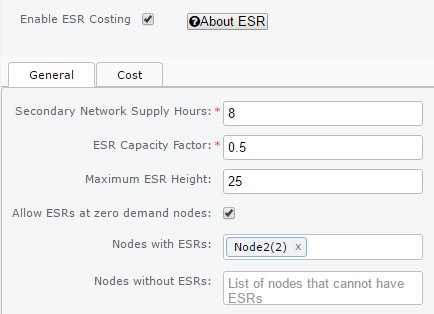
| Field | Description |
|---|
| Secondary Network Supply Hours Double | Hours per day that an ESR provides water to its secondary network. |
| ESR Capacity Factor Double | Size of ESR relative to the daily demand it serves. E.g. 0.5 means ESR capacity is half the daily demand. |
| Maximum ESR Height Double (m) optional, default: no constraint | Maximum ESR height in metres. |
| Allow ESRs at zero demand nodes Boolean default: false | Allow ESRs at nodes with zero demand. Disabling this significantly speeds up optimization. |
| Nodes with ESRs | List of nodes that must have ESRs. Default: no constraint. |
| Nodes without ESRs | List of nodes that must not have ESRs. Default: no constraint. |
ESR Cost Tab
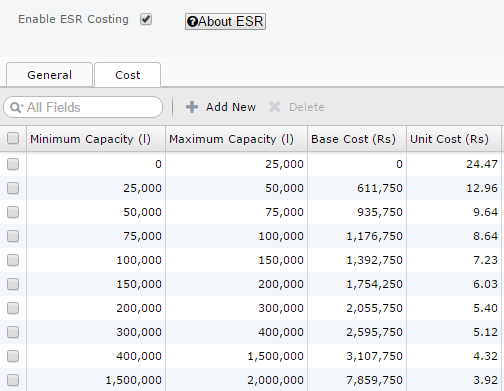
| Field | Description |
|---|
| Minimum Capacity Double (L) default: max of previous row | Minimum capacity for this row in the ESR cost table. |
| Maximum Capacity Double (L) | Maximum capacity for this row in the ESR cost table. |
| Base Cost Double (Rs) default: calculated from previous row | Base cost of an ESR with capacity in this range. |
| Unit Cost Double (Rs/L) | Unit cost per litre for an ESR in this capacity range. |
| Add New | Add an extra row to the ESR cost table. |
| Delete | Remove selected rows. |
Pump Tab
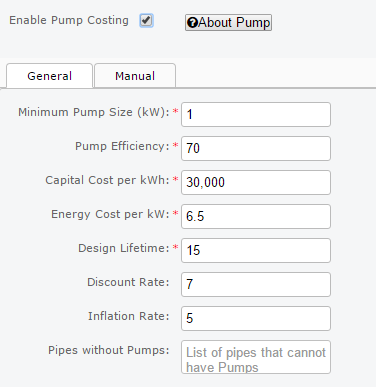
| Field | Description |
|---|
| Minimum Pump Size Double (kW) | Minimum pump size in kW that can be installed. |
| Pump Efficiency Double (%) | Efficiency of the pump expressed as a percentage. |
| Capital Cost per kW Double (Rs) | Capital cost of the pump per kW of installed capacity. |
| Energy Cost per kWh Double (Rs) | Energy cost per kWh consumed. |
| Design Lifetime Integer (years) | Number of years for which pumps will be operational. |
| Discount Rate Double (%) default: 0 | Interest rate as a %. Higher discount rate reduces the effective energy cost of the pump. |
| Inflation Rate Double (%) default: 0 | Rate at which prices rise as a %. Higher inflation rate increases the effective energy cost of the pump. |
| Pipes without Pumps | List of pipes that cannot have pumps. Default: no constraint. |
Results Tab
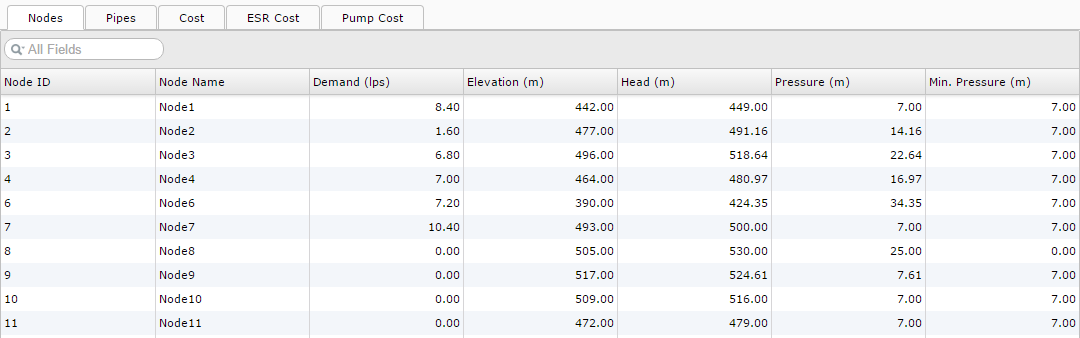
| Sub-tab | Contents |
|---|
| Node Tab | Node-wise results including head and pressure values for each node. |
| Pipe Tab | Pipe-wise results including flow, diameter, headloss, headloss per km, and cost for each pipe. |
| Cost Tab | Cost results for each diameter of commercial pipe used. |
| ESR Tab | Cost results for each ESR to be constructed. |
| Pump Tab | Cost results for each pump to be installed. |
Hints & Troubleshooting
If you get a timeout message, try one or more of the following:
- Reduce the number of possible ESR locations.
- Disable ESR at dummy (zero demand) nodes.
- Disable ESR optimization entirely.
- If the network still times out, download and use the local version of JalTantra.
If you get a message saying "unable to solve network", try one or more of the following:
- Lower the minimum node pressure (in the General tab or for specific nodes).
- Increase the head of your source node.
- Reduce demand for nodes.
- Reduce elevation for nodes.
- Add commercial pipes with larger diameters.
- Verify that you are using units consistently throughout.
